DNS Secure

DNS Secure
An Easy Guide for Everyday Users
What Is DNS Secure?
Datto DNS Secure is a tool that helps keep your computer safe when you go online. Every time you visit a website, it quickly checks to make sure that site is safe. If a website is known to be dangerous, DNS Secure blocks it so you don’t get hurt by it.
Think of it like a security guard for the internet. It stops you from walking into places that could steal your information or put bad software on your computer.
What Kinds of Websites Get Blocked?
DNS Secure blocks websites that can hurt your computer or trick you, like:
- Sites that install viruses or bad software
- Fake sites that try to steal your passwords (called phishing)
- Sites that pretend to be real companies but aren’t
- Other sites your company has marked as unsafe
What Happens When a Website Gets Blocked?
If DNS Secure thinks a website is unsafe, it stops you from opening it. You might see a warning page or a message that says the site can’t be reached.
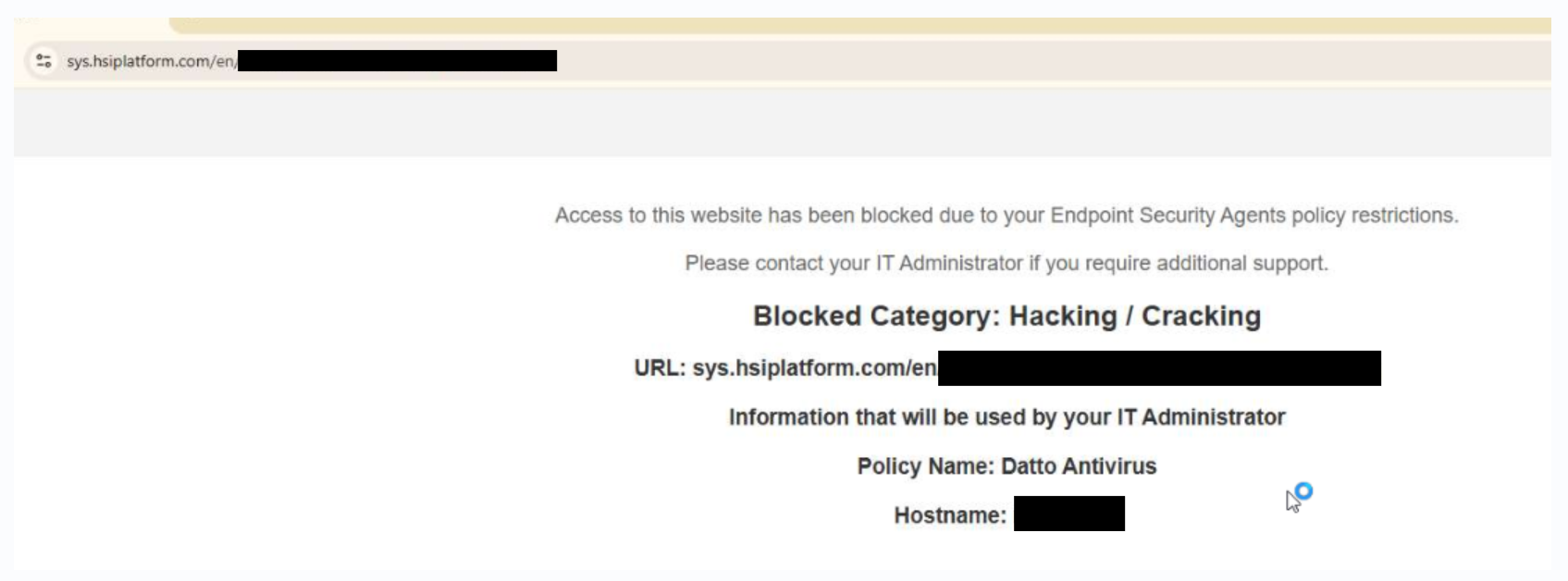
Example: the blocked website message you might see
What If I Really Need a Blocked Website?
Sometimes a safe website gets blocked by mistake. If you need a website for your job and it’s blocked, just ask the Service Desk to check it for you.
Please don’t try to get around the block on your own. The tech team will look at the website and decide if it’s safe to open.
How to Ask for a Website to Be Checked
To make things go faster, give the tech team as much info as you can.
What to Include
- The full website address (the link)
- Why you need the website for work
- A picture of the block message, if you have one
- The date and time it happened
How to Send a Support Ticket
You can ask for help in one of these ways.
Way 1 - Help Button
With the Website Blocked page still open, follow the steps in the following article: How to Use the Help Button - Sprinter Help Docs
This is the most effective way to get a quick resolution. Some clients have increased security and privacy for compliance reasons, and their Help button works differently; if your Help button looks different from the first article, see this one or Way 2 below: Submitting a ticket with the RMM "bug" - Sprinter Help Docs
Way 2 – Email
Send an email to: support@sprintermsp.com
Here is an example of what to write:
Subject | Blocked Website – [Website Name] |
Website Link | https://example.com |
Why I Need It | I use this site to do my work |
Date / Time | 07/28/2026 10:15 AM |
Picture Attached | Yes |
What Happens After I Send My Request?
After you send in your request:
- The Service Desk reads what you sent.
- The tech team checks if the website is safe.
- If it’s safe, they will unblock it for you.
- They will let you know when they are done.
How long this takes can be different for each website, depending on how careful the team needs to be.
Common Questions
Will this slow down my normal internet use?
No. Most people won’t notice any difference. DNS Secure only blocks websites that are known to be unsafe.
Why did a good website get blocked?
Sometimes the tool makes a mistake, or a website may have recently become unsafe due to hackers. Just ask the Service Desk to check it, and they can fix it if it’s safe.
Can I turn off DNS Secure myself?
No. DNS Secure is set up by your company to keep everyone safe, so it can’t be turned off by users.